Real estate AI courses: prompts, assistants and broker workflows
A prompt course, configured assistant, and broker-oriented workflow instruction ask for different setup. Choose by the work you want to repeat and the software you can support.
The selected choices span agent prompt drafting, assistant configuration, and broker workflow instruction. Compare the task sequence, not just whether a catalog uses the term AI. A prompt may suit a writing task; an assistant may require files and setup; a broker workflow may involve team roles and approvals.
Practice: A seller-update workflow
Estimate your capacity for setup and upkeep. Check required accounts, whether access is included, and whether the lessons use real estate examples. Ask whether the course teaches you to build something, demonstrates a tool, or changes the process around it.
ILLUSTRATIVE EXAMPLE · FICTIONAL INPUTS
Illustrative example: a seller-update workflow
Bring these inputs
A fictional team wants a recurring update assembled from approved status notes and reviewed by the listing agent.
Try this process
Compare a reusable prompt, configured assistant, and team process map. Identify inputs, permissions, and approval points for each.
Check the result
Confirm who maintains templates or assistants and how a draft is checked against current transaction information.
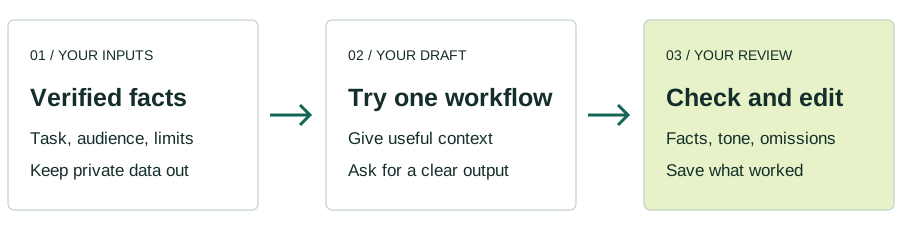
01 / Your inputsVerified facts
Task, audience and limits
02 / Your draftTry one workflow
Give context. Ask for a clear output.
03 / Your reviewCheck and edit
Facts, tone and omissions
Use the example to choose a practice task. An illustrative workflow, separate from any provider’s curriculum.
Selected options to compare
Compare the advertised learning details on each profile. Confirm price, dates and eligibility with the provider.
Write fact-, output- and tone-specific listing prompts; plan six-step Reels and listing ads, draft segmented newsletters and prospecting scripts, then turn scripts into videos with Pictory or Murf.
Turn verified listing facts into copy and showing notes, segment client follow-up, explain CMAs without inventing prices, prepare inspection and closing messages, and plan reusable prompts.
Build three custom GPTs: a seven-question lead qualifier that exits represented clients, a six-point market update formatted five ways, and a listing-description assistant.
Use CLEAR prompts and Custom Skills with Drive and Sheets MCP to calculate property metrics for market reports and turn transaction dates into Tennessee deadline and owner checklists with contingency branches.
Abstract leases into a 25-field cited table with missing-field markers; research owner profiles, prioritize outreach, and prepare OMs or BOVs, tenant targeting and a 90-day broker plan.